


In the modern digital landscape, efficiency is everything. Whether you’re managing a startup, leading a team, or juggling multiple projects, tech workflow optimization is crucial for getting more done in less time. But what exactly does it mean? Simply put, it’s about refining the way technology is used in your workflow to save time, reduce errors, and maximize productivity.
Think of it as fine-tuning an engine: when every part works seamlessly, the output is smooth, fast, and highly efficient. In this guide, we’ll dive deep into the principles, strategies, tools, and benefits of tech workflow optimization.
What is Tech Workflow Optimization?

Tech workflow optimization is the process of analyzing, refining, and automating digital processes to make them more efficient. It’s not just about using the latest software—it’s about using technology smartly.
A workflow is essentially the step-by-step process that a task or project goes through from start to finish. When these steps involve technology, optimizing them means:
- Eliminating unnecessary steps
- Reducing manual tasks
- Integrating tools to work together
- Tracking progress efficiently
- Improving collaboration
For instance, imagine your team uses email, Slack, and Google Drive for a single project. Without optimization, information gets scattered, tasks are duplicated, and deadlines are missed. Proper workflow optimization integrates these tools, automates repetitive actions, and ensures smooth communication.
Why Tech Workflow Optimization Matters
Businesses and individuals increasingly rely on technology to manage work. Without optimization, tech can become a source of inefficiency rather than productivity. Benefits of optimized workflows include:
- Boosted Productivity – Less time spent on repetitive tasks means more time for strategic work.
- Fewer Errors – Automation reduces human mistakes.
- Better Collaboration – Teams can work together seamlessly, even remotely.
- Time and Cost Savings – Streamlined processes reduce wasted hours and operational costs.
- Scalability – Optimized workflows grow with your business without causing bottlenecks.
In short, tech workflow optimization turns your digital tools into productivity powerhouses rather than fragmented, chaotic systems.
Step-by-Step Strategies for Tech Workflow Optimization
1. Map Your Current Workflow
Start by understanding your existing processes. Document every step:
- How tasks are assigned
- How approvals are handled
- Which tools are used at each stage
For example, if you’re managing content creation:
- Idea generation in Google Docs
- Review via email
- Scheduling in social media tools
Mapping your workflow allows you to spot bottlenecks, redundancies, and delays. Once identified, you can address these issues systematically.
2. Automate Repetitive Tasks
Automation is the heart of tech workflow optimization. Repetitive tasks like sending reminders, updating spreadsheets, or transferring files can consume hours weekly. Automation tools can handle these tasks efficiently:
- Zapier – Connects apps and automates workflows without coding.
- IFTTT – “If This Then That” automation for simple triggers.
- Microsoft Power Automate – Automates processes within the Microsoft ecosystem.
Example: Automatically save email attachments to cloud storage and notify your team via Slack. This eliminates manual downloading, organizing, and sharing.
3. Integrate Your Tools
Using multiple apps without integration slows you down. Integrations ensure your tools work together instead of in silos.
- Project Management + Communication: Connect Asana or Trello with Slack so task updates appear instantly.
- CRM + Email Marketing: Integrate Salesforce or HubSpot with Mailchimp for seamless lead management.
- Cloud Storage + Collaboration: Sync Google Drive with Microsoft Teams for easy file access.
Integration reduces switching costs, improves data consistency, and speeds up decision-making.
4. Standardize Processes
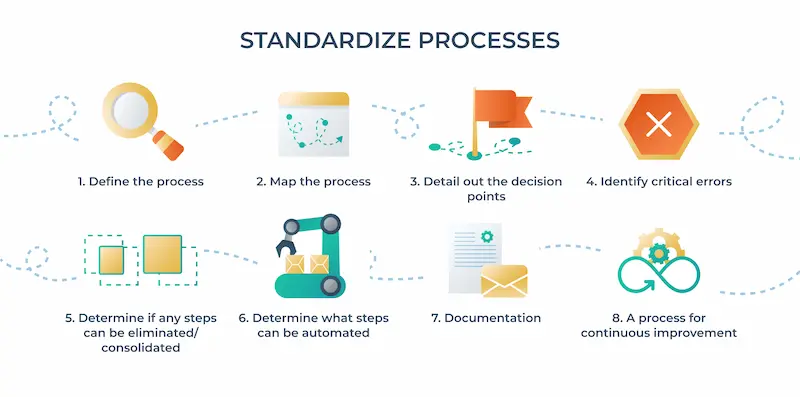
Consistency is key. Standardizing procedures ensures everyone follows the same steps, reducing confusion and errors.
- Create templates for common tasks like reports, emails, or project updates.
- Define naming conventions for files, folders, and projects.
- Document processes so new team members can onboard quickly.
5. Monitor Performance and Analyze Metrics
Workflow optimization is an ongoing process. Use analytics to track:
- Task completion times
- Bottlenecks in approvals or reviews
- Tool usage efficiency
- Error rates
Tools like Jira, Monday.com, and Trello Analytics provide insights into productivity trends and highlight areas for improvement.
6. Invest in Team Training
Even the most optimized tech stack fails if your team doesn’t use it correctly. Training ensures:
- Everyone understands best practices
- Tools are used to their full potential
- New features are implemented efficiently
Short video tutorials, workshops, or internal documentation can make a big difference in adoption.
7. Regularly Review and Update Workflows
Tech and business environments evolve quickly. Periodically revisit your workflows to:
- Add new automation
- Remove outdated tools
- Refine processes based on team feedback
Continuous improvement is the secret to sustainable tech workflow optimization.
Common Challenges in Tech Workflow Optimization
While the benefits are clear, you may face obstacles:
- Resistance to Change: People prefer familiar routines. Solution: show value and provide training.
- Too Many Tools: Using excessive apps can overwhelm. Solution: focus on essential tools and integrate them effectively.
- Poor Communication: Even optimized processes fail without clear communication. Solution: establish clear protocols for updates, approvals, and notifications.
You may also like to read this:
Top Programming Apps To Learn Coding Anywhere
Tech Solutions For Developers To Boost Productivity
Top Software Solutions For Coding Every Developer Should Use
Coding Problem Solutions: Step-By-Step Guide
Developer Productivity Hacks: Boost Coding Efficiency
Tools That Enhance Tech Workflow Optimization
Here’s a practical list of tools to get started:
- Trello/Asana – Task and project management
- Slack/Microsoft Teams – Communication and collaboration
- Zapier/IFTTT – Automation of repetitive tasks
- Google Workspace/Microsoft 365 – Cloud collaboration and storage
- Jira – Performance monitoring and workflow analysis
Each tool should be selected based on your team’s specific needs, integrations, and scalability.
Real-Life Example
Consider a marketing team managing multiple campaigns. Without optimization, they manually track content in spreadsheets, communicate through email chains, and schedule posts individually.
After implementing tech workflow optimization:
- All campaigns are tracked in Trello
- Slack integration sends task updates automatically
- Google Drive stores assets with standardized naming
- Zapier automates social media scheduling
Result? Tasks are completed faster, errors drop, and team members spend more time on creative work instead of administrative chores.
Final Thoughts
Tech workflow optimization is more than just efficiency—it’s about creating a smarter, faster, and less stressful way of working. By mapping workflows, integrating tools, automating repetitive tasks, and continuously monitoring performance, you can turn your technology stack into a productivity engine.
Remember, optimization is an ongoing journey. Start small, focus on impactful changes, and scale gradually. With the right strategies and mindset, tech workflow optimization will empower you and your team to achieve more with less effort.
FAQs on Tech Workflow Optimization
1. What is tech workflow optimization?
Tech workflow optimization is the process of improving how technology is used in your work processes. It involves automating repetitive tasks, integrating tools, and refining workflows to increase efficiency, reduce errors, and save time.
2. Why is tech workflow optimization important?
Optimizing workflows ensures tasks are completed faster, reduces human errors, improves team collaboration, and helps businesses scale without operational bottlenecks. It transforms technology from a set of tools into a productivity engine.
3. How can I identify inefficient workflows?
Start by mapping out your current processes. Look for:
Repetitive or redundant tasks
Manual data transfers between tools
Bottlenecks in approvals or communication
Tasks that frequently cause errors
Once identified, you can prioritize improvements.
4. What tools are best for tech workflow optimization?
Some widely used tools include:
Trello/Asana – Project and task management
Slack/Microsoft Teams – Team communication
Zapier/IFTTT – Automation of repetitive tasks
Google Workspace/Microsoft 365 – Cloud collaboration
Jira – Workflow tracking and performance analytics
The best tools depend on your team size, workflow complexity, and integration needs.
5. Can automation replace human work completely?
No. Automation is meant to handle repetitive, rule-based tasks, freeing humans to focus on strategic and creative work. The key is combining automation with human oversight for the best results.